Keto barcode scanner: scan a pack, see its net carbs
A keto barcode scanner reads a packaged food's nutrition data from its barcode and counts the net carbs. Keto Kit's barcode scanner is free. For food without one, it can read the nutrition label or estimate a plate from a photo, and every scan ends with the net carbs counted and what is left today.
- Last updated
- Three ways to scan
- Free on iPhone and Android
Point the camera at the pack
What does a keto food scanner do?
It saves you typing numbers. You point your phone's camera at a food, the app finds or reads its nutrition, and a keto scanner then does the one sum that matters: total carbs, minus fiber, minus the sweeteners your body does not absorb, as far as the scan found them.
Keto Kit has three of them, because food arrives three ways: in a pack with a barcode, with a printed nutrition label, or on a plate. Whichever you use, you see how the net carbs were counted and how many grams you have left for the day. The sum itself is explained on the net carb counter page.
Key takeaways
- Barcode for packs, label scan for printed labels, photo scan for plates.
- The barcode scanner is free, and so are three label scans a day.
- Photo scan asks about the butter or oil a photo cannot see.
- A scan reads the numbers. Check the ingredients for hidden sugars yourself.
Barcode, label or photo: which scan should you use?
Use the barcode scanner for anything in a pack, a label scan when the pack is sweetened with sugar alcohols or allulose (only the label lists them), and a photo scan for food on a plate. Tell the page what is in front of you and it points to the right one.
- Use this one
Barcode scan
Point the camera at the barcode on the pack and the food is found and logged: first among foods you saved before, then in a product database. Then you can scan another.
- Right for
- Bars, snacks, drinks, sauces: anything packaged.
- You get
- Calories, protein, fat, total carbs and fiber. Sweeteners are often missing, so only fiber comes off.
-
Label scan
Point the camera at the Nutrition Facts panel and the app reads the numbers off it, then counts the net carbs from the total carbs, fiber and sugar alcohol lines.
- Right for
- Bars, sweets and anything sweetened with erythritol, allulose or other sugar alcohols. Also a pack whose barcode doesn't come up.
- You get
- Every line of the label, sweeteners included, so your rule can take them all off.
-
Photo scan
Take a photo of the plate and the app finds the foods and estimates the amounts. Then it asks whether the food was cooked in anything, because a photo cannot see butter or oil.
- Right for
- Home cooking and meals out, where nothing has a label.
- You get
- Foods and amounts to check, then the fat they were cooked in.
The barcode scanner is free and three label scans a day are free; photo scan and unlimited label scans need Premium. Nothing to scan? You can also type or say a whole meal, or tap a usual.
What happens after you scan?
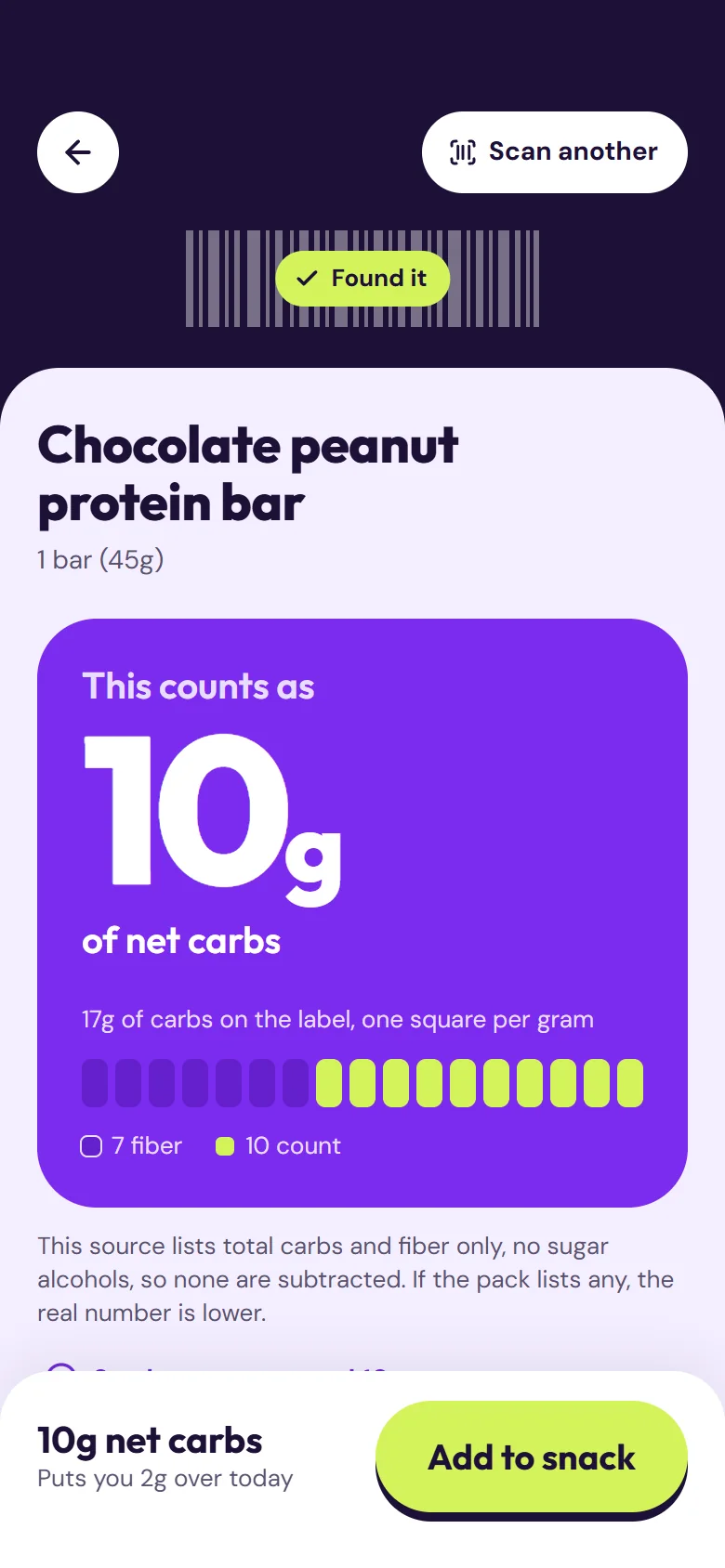
You see the net carbs worked out in front of you, line by line, and the food comes off what you have left today. Here is the same protein bar scanned two ways, and dinner by photo, all from the same day in the app.
One bar, two scans
Chocolate peanut protein bar
1 bar (45g)
By barcode
- Total carbs17g
- Fiber− 7g
- Net carbs10g
"This source lists total carbs and fiber only, no sugar alcohols, so none are subtracted. If the pack lists any, the real number is lower."
By label scan
- Total carbs on the label17g
- Fiber− 7g
- Erythritol− 6g
- Allulose− 2g
- Net carbs2g
The label scan reads the sweetener lines a product database leaves out: 8g fewer net carbs for the same bar. Save the bar from a label scan with its barcode, and the next barcode scan finds your saved version first.
After a photo scan
Salmon and asparagus, from a photo
- Salmon fillet, about 5 oz0g net, 20g fat
- Asparagus, 8 spears2g net, 0g fat
Cooked in anything?
Then it comes off your day
Before dinner, Today said 8g left. Logging the photo scan's 4g leaves you 4g.
eaten earlier, 12gthe scanned dinner, 4gleft, 4g
Every scan is counted with your rule, standard or strict, but a rule can only take off what the scan found: a barcode usually brings total carbs and fiber, a label scan brings every line. Try the rule on any label with the net carb calculator.
Download freeHow do you check a food is keto before you buy it?
Scan the barcode in the aisle, before it goes in the cart, then read what a scan can't judge for you. "Keto-branded" products are the most common offenders: many have hidden carbs from maltitol or unnecessary fillers.
- 1Scan the barcode and read the net carbs per serving. If the pack lists sugar alcohols or allulose, scan the label instead.
- 2Check the serving size against what you will eat. A protein bar may be 2 servings.
- 3Turn the pack over and look for hidden sugar names in the ingredients.
- 4Ignore "keto" on the front. It is an unregulated marketing term.
The full walk through the store is in how to grocery shop for keto, and every label line in how to read keto labels.
Sugar by another name
Sugar appears under at least 60 different names. Common ones to watch for in the ingredients list:
- maltodextrin
- corn syrup
- high-fructose corn syrup
- dextrose
- brown rice syrup
- agave
- fruit juice concentrate
- evaporated cane juice
- honey
- molasses
- malt syrup
- barley malt
- maltitol
Maltodextrin is especially sneaky: it is marketed as "non-sugar" but has a glycemic index higher than table sugar. For the full list of what to skip, see foods to avoid on keto.
Questions about scanning food for keto
Is the Keto Kit barcode scanner free?
Yes. The barcode scanner is part of the free app on iPhone and Android, along with tracking net carbs and macros, with ads.
Can I scan a nutrition label for net carbs?
Yes. Point the camera at the nutrition label and Keto Kit reads the numbers and counts the net carbs. Three label scans a day are free.
Is a barcode scan more accurate than a photo?
For packaged foods, yes, for calories, protein, fat and total carbs: a barcode looks the product up instead of estimating it. For sweeteners a label scan reads more, because product databases usually list total carbs and fiber only. A photo scan estimates the foods and amounts on a plate, so check what it found and tell it about any butter, oil or dressing.
Does a scan count sugar alcohols?
It depends on the scan. A label scan reads every line, so your rule can take off erythritol, allulose and the other sweeteners. A barcode result usually has total carbs and fiber only; then the app takes off fiber alone and says so: "If the pack lists any, the real number is lower." A food you saved earlier from a label scan keeps every line.
Why ask about butter or oil after a photo?
A photo cannot see butter, oil or dressing, and on keto that is where a lot of a meal's fat is. In the app's own example, adding the garlic butter a salmon dinner was cooked in adds 18g of fat and 2g of net carbs the photo missed.
Why does the app's number differ from the package?
Two reasons. A barcode result usually has no sugar alcohol lines, so the app takes off fiber only and its number is higher than the pack's; a label scan reads the sweeteners and closes the gap. And many "keto" products print a net carb figure that treats every sugar alcohol as zero, which isn't accurate for maltitol.